Atomic Habits in a Habit Tracker: The 4 Laws Applied
James Clear's 4 Laws of Behavior Change mapped to practical habit tracker settings. Make habits obvious, attractive, easy, and satisfying.
James Clear's Atomic Habits has sold more than 15 million copies. The 4 Laws of Behavior Change — make it obvious, make it attractive, make it easy, make it satisfying — are among the most referenced frameworks in self-improvement. And yet most readers never translate those laws into a daily system.
Knowing the framework is not the same as living it. The gap between "I should build better habits" and actually showing up every day is a systems problem, not a knowledge problem. A habit tracker is the bridge — but only if the tracker applies the same laws that the book describes.
This article maps each of the 4 Laws to concrete settings and features you can use today. No theory without practice. No framework without a button to press.
The 4 Laws at a glance
Clear's model describes a four-step feedback loop. Every habit passes through these stages, and each law targets one of them:
| Law | Stage | Goal |
|---|---|---|
| 1. Make it Obvious | Cue | Design your environment so you notice |
| 2. Make it Attractive | Craving | Pair it with something you enjoy |
| 3. Make it Easy | Response | Reduce friction, start small |
| 4. Make it Satisfying | Reward | Track progress, feel the win |
The laws form a loop. A visible cue leads to a craving, which leads to a response, which leads to a reward — and the reward reinforces the cue for next time. A good habit tracker makes each stage frictionless. Let's walk through them.
Law 1 — Make it Obvious
A habit will not happen if you forget it exists. The first job of any system is to make the cue impossible to miss. In Clear's model, this is about environment design — placing triggers in your physical space so the right behavior becomes the obvious choice.
A habit tracker serves the same function digitally. When the app tells you what is due today and nudges you at the right moment, it becomes the cue.
How to apply this
- Set a reminder at the exact time and place. HabitGrip supports fixed and relative notification times with custom schedules. If you want to meditate at 7:00 AM, set the reminder for 7:00 AM — not "sometime in the morning."
- Use the Today view as your daily cue. Open the app and see only what is due. No noise, no clutter. The Today screen is your environment design in action.
- Tag habits by context.Create tags like "Morning," "Commute," or "Desk" so you can filter by when and where each habit happens. This mirrors Clear's concept of implementation intentions — connecting a behavior to a specific moment.
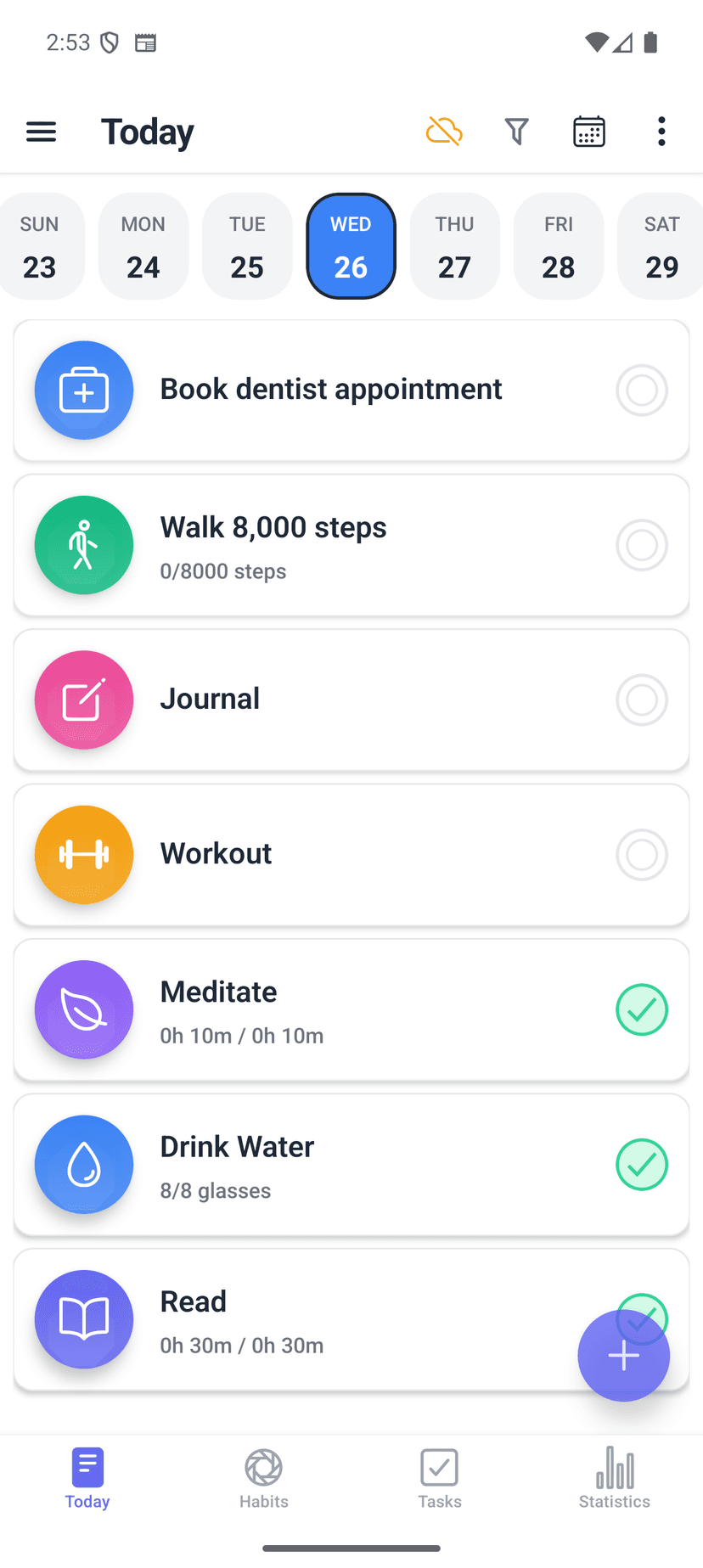
The test: If you can open the app and immediately see what to do next, the cue is working. If you have to search for it, the environment needs redesigning.
Law 2 — Make it Attractive
Clear's second law is about craving. The more appealing a behavior feels, the more likely you are to do it. He introduces temptation bundling — pairing an action you need to do with one you want to do — as a practical technique.
A habit tracker can support this in two ways: by making the tracking experience itself pleasant, and by giving you a way to organize habits so they feel like a coherent system rather than a random list.
How to apply this
- Bundle habits intentionally.Create paired habits — "Listen to podcast" + "Go for a walk" — and schedule them at the same time. HabitGrip's flexible scheduling lets you align multiple habits to the same slot.
- Use profiles and tags as categories. Organize your habits into life areas — Work, Fitness, Personal — using profiles and tags. A structured tracker feels like a system you designed, not a chore list you inherited.
- Give each habit a visual identity. HabitGrip lets you choose an icon and color for each habit. This sounds cosmetic, but a habit with a book icon and a warm color feels different from one with a default gray square.
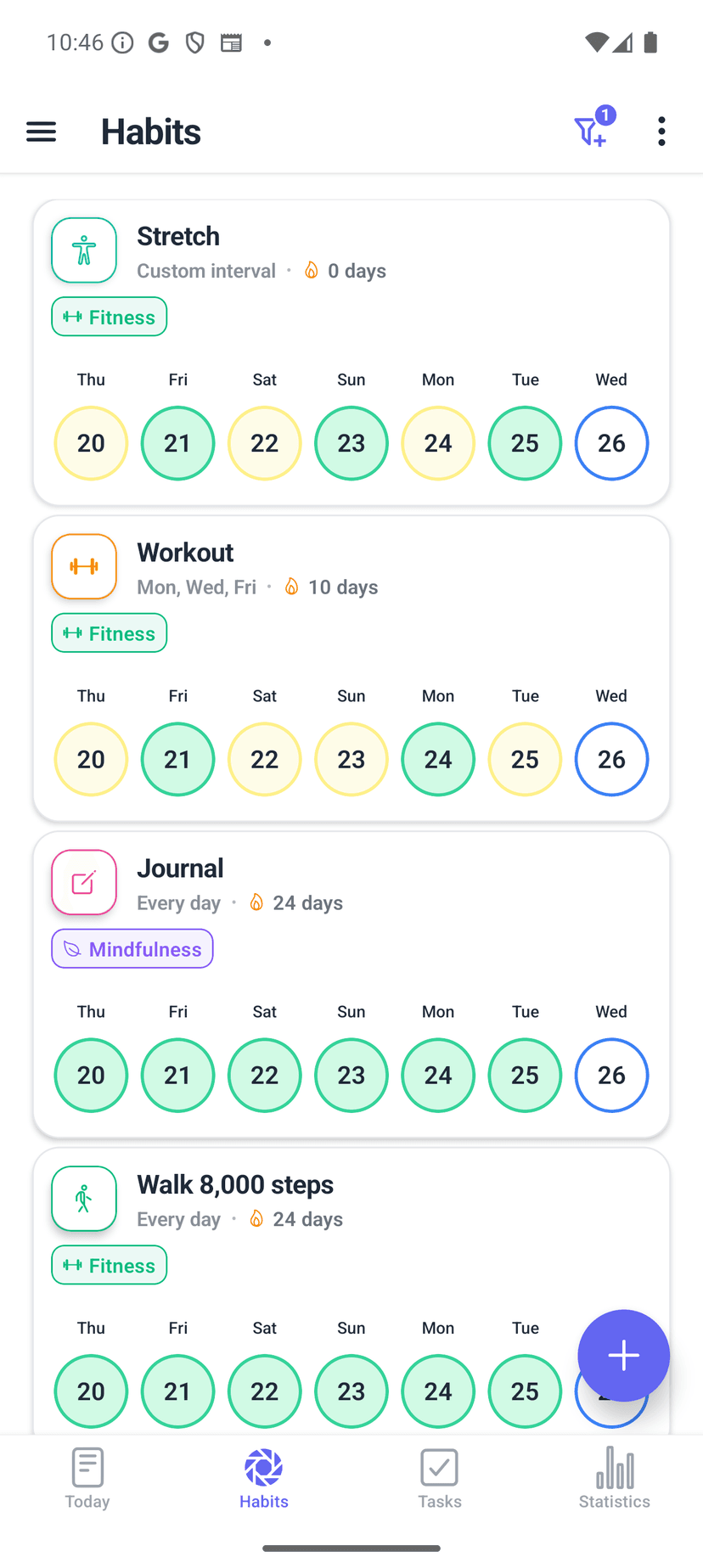
The test: Does your tracker feel like something you want to open? If the interface feels like a spreadsheet, the attraction step is missing.
Law 3 — Make it Easy
The third law targets the response — the actual behavior. Clear argues that motivation gets you started, but friction determines whether you continue. The fewer steps between you and the habit, the more likely you are to do it.
This is where most habit trackers fail. They ask for too much configuration, force daily schedules on non-daily habits, or make the tracking experience feel like data entry. The result: the tracker itself becomes the friction.
How to apply this
- Choose the right schedule from the start.Do not force "every day" when the habit is "3 times per week." HabitGrip supports specific weekdays, frequency goals, interval schedules (every N days), and complex patterns like alternate-day cycles.
- Use yes/no for binary habits.If completion is just "did I do it?" — one tap. No numbers, no timers, no overthinking.
- Skip without guilt.Mark a day as "Skipped" instead of "Failed." Skipped days preserve your streak. For a deeper look at this, see our guide on tracking habits without obsessing over streaks.
- Go offline.HabitGrip works without an account or internet connection. No loading screens, no "sign in to track your habit." Open, tap, done.
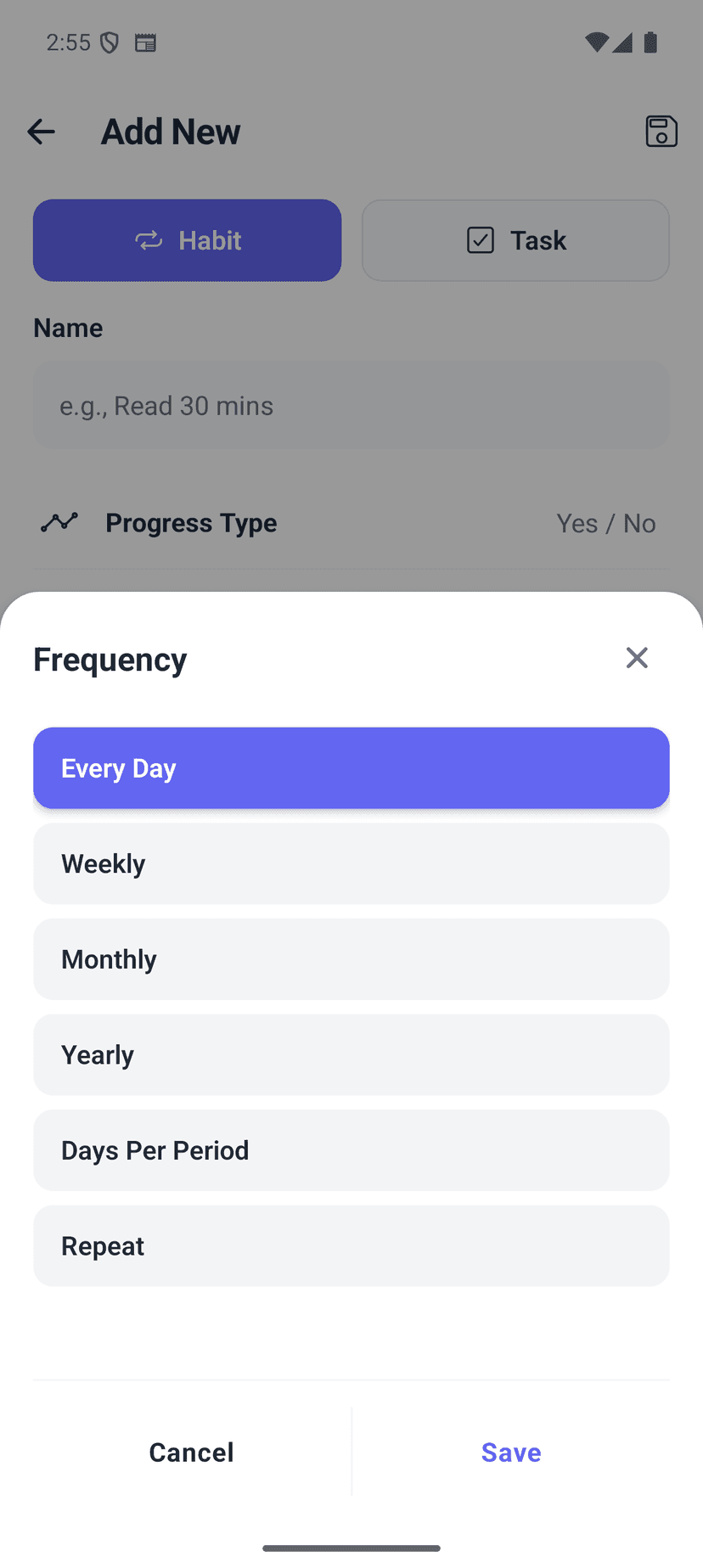
The test: How many seconds does it take from opening the app to recording a habit? If the answer is more than five, something needs simplifying.
Law 4 — Make it Satisfying
The fourth law closes the loop. Clear writes that the human brain is wired to repeat behaviors that feel rewarding. The problem with most habits is that the reward is delayed — you exercise today but feel the benefit weeks later. A tracker bridges that gap by making progress visible immediately.
But not all visualizations are equal. A streak number is one data point. A heatmap, a trend line, and a momentum chart tell a richer story — one that helps you understand yourself, not just count completions.
How to apply this
- Open the Statistics view once a week. HabitGrip provides heatmaps, streak counters, consistency trends, day-of-week analysis, and monthly performance views. The weekly check-in turns raw data into self-knowledge.
- Watch the heatmap fill in. The GitHub-style contribution graph gives you a visual sense of density and momentum. Seeing a week of colored cells is intrinsically satisfying — no gamification required.
- Use momentum to see direction. The momentum chart shows whether you are accelerating or decelerating. This gives you a sense of trajectory, not just a snapshot of today.
- Let streaks be a quiet record. HabitGrip shows your current and best streaks as a metric — not as the single measure of success.
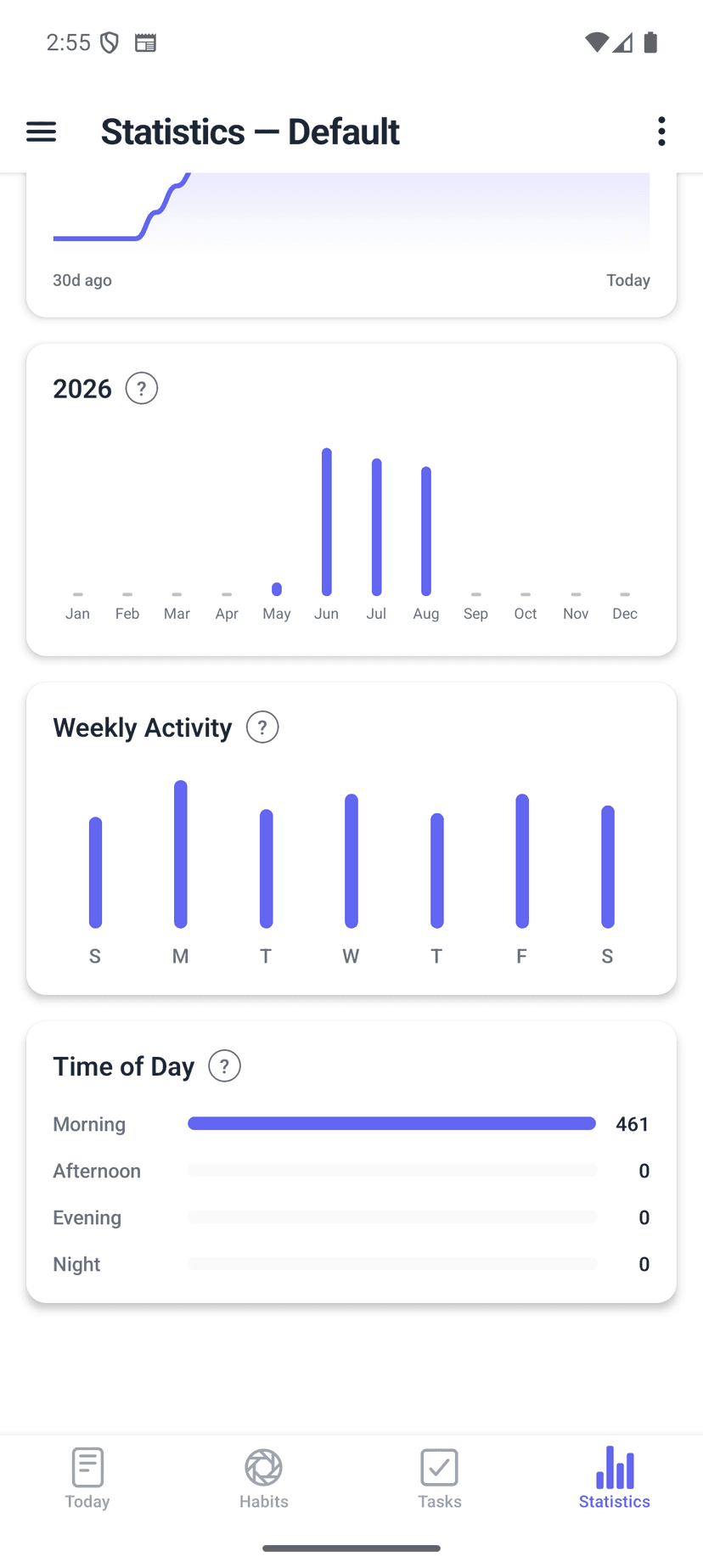
The test: After a week of tracking, can you open the app and see something that surprises you about your patterns? If yes, the satisfaction loop is working.
Putting it all together: a sample week
Here is how the 4 Laws look in practice when you set up a single habit — in this case, reading for 20 minutes before bed.
| Law | Action in HabitGrip |
|---|---|
| 1. Make it Obvious | Set a reminder for 9:00 PM. Tag it "Evening" so it appears in the right context. |
| 2. Make it Attractive | Give it a book icon and a warm color. Place it under a "Personal" profile. |
| 3. Make it Easy | Schedule: every day, yes/no type. The goal is just to open the book. |
| 4. Make it Satisfying | After one week, check the heatmap and momentum chart. |
This is the 4 Laws in a single habit. Repeat the process for each new behavior you want to build. The loop compounds: each satisfied habit makes the next one easier to start.
Why this approach works
The 4 Laws are not a one-time checklist. They are a feedback loop. Each law reinforces the next: a visible cue leads to a craving, which leads to a response, which leads to a reward — and the reward makes the cue more salient next time.
A habit tracker is the tool that makes this loop visible. Without one, you are running the loop blind — relying on memory, motivation, and willpower to carry you through. With one, the system does the remembering, the scheduling, and the pattern recognition for you.
The result is not a perfect record. It is an honest one. And an honest record, reviewed regularly, is how habits actually stick — not because of willpower, but because of system design.
Frequently asked questions
Do I need to read Atomic Habits to use these tips?
No. The 4 Laws are a useful framework, but the practical steps in this article work regardless. Each section maps a law to concrete settings you can apply in any habit tracker — including HabitGrip.
How many habits should I start with?
One to three. Start with the simplest version of each habit, track it for two weeks, and add complexity only when the behavior starts to feel automatic.
What schedule should I use for a new habit?
Daily or every other day for the first two weeks. Once the behavior feels automatic, switch to a frequency goal such as three times per week if every day is not realistic.
How do I avoid obsessing over streaks?
Treat streaks as a quiet record, not a scorecard. Use a skipped status for planned breaks and vacation mode for longer pauses. The goal is consistency over time, not a perfect daily count.
Can I track both habits and tasks in the same app?
Yes. HabitGrip supports recurring habits and one-off tasks in the same Today view, so your routine and your to-do list live in one place.
Is HabitGrip free?
Yes. The full tracker is free for everyday use with no ads. An optional paid plan unlocks unlimited habits, tasks, and cloud sync.
Start with one habit, one law, one week
You do not need to overhaul your entire routine. Pick one behavior you want to build, apply one law you have been neglecting, and give it seven days. The framework is simple — and that is the point. Complexity is the enemy of consistency.
Atomic Habits is a book about systems, not goals. A good habit tracker does the same thing: it makes the system visible so you can trust it. Set one reminder, give it a schedule, and watch the heatmap fill in. That is the 4 Laws in practice.
“You do not rise to the level of your goals. You fall to the level of your systems.”
— James Clear, Atomic Habits
Turn the 4 Laws into a daily system
HabitGrip maps every law to a feature you can set up today. Track habits offline, skip days honestly, and watch your consistency grow.